COI Tracking Software That Catches Lapses Before They Become Claims
Every vendor's certificate of insurance is valid until the day it isn't. Entuitive Workforce collects COIs at onboarding, has a person on our compliance team review each one, then monitors every expiry date daily — so a lapse triggers an alert, not a liability transfer.
Why manual COI tracking fails
A certificate of insurance is a snapshot: it proves coverage existed on the day it was issued, nothing more. The policy behind it can be cancelled mid-term or narrowed at renewal while the certificate sits in an inbox, still asserting coverage that no longer exists. A spreadsheet records what was true at collection; it does not watch what happens next.
The failure is asymmetric: tracking COIs manually costs a few admin hours per week, while one missed lapse costs whatever the incident costs — because an uninsured vendor's claim has a way of finding the property owner or general contractor who let them on site. Our analysis of contractor insurance lapses covers how often coverage quietly disappears between annual checks.
How COI tracking works on Entuitive Workforce
Collect
Vendors upload their certificates through a guided onboarding flow — completed in minutes, not weeks, with no email chains and no PDF folders.
Review
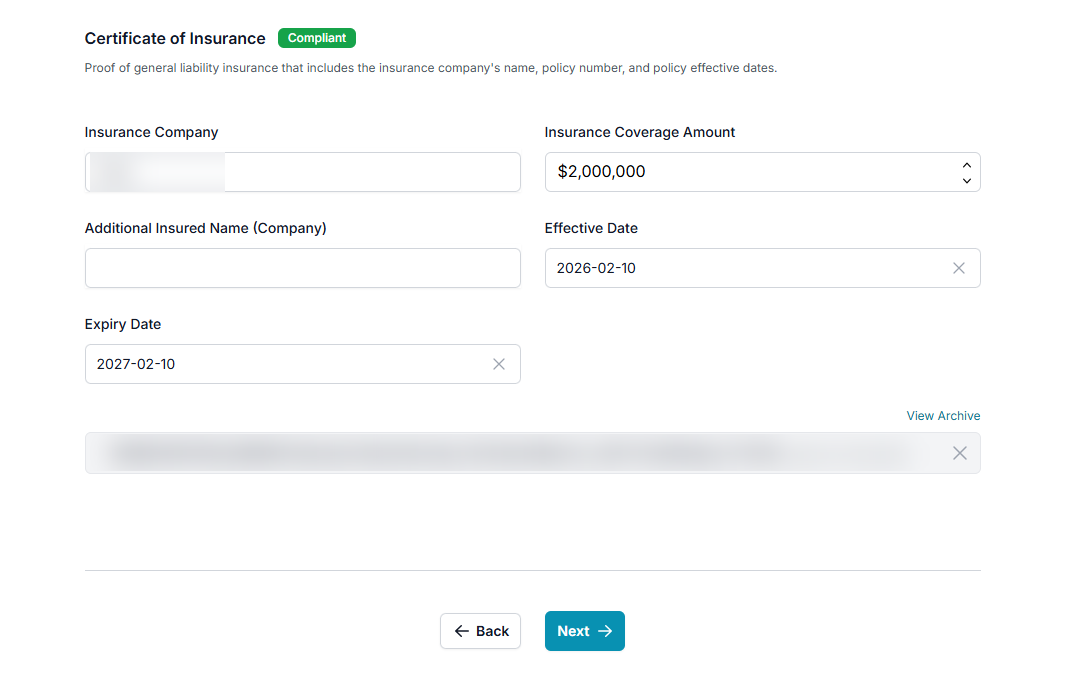
A person on our compliance team checks each COI against the requirements you set: coverage types, limits, additional insured wording and validity dates. Non-conforming certificates are flagged before the vendor starts work, not after.
Monitor
Every certificate is tracked against its expiry date, every day. Approaching expiries trigger alerts to the vendor and to your team, with time to renew before a gap opens.
Prove
Every review is logged, so an auditor, insurer, or lawyer asking "did you check?" gets a timestamped answer in minutes.
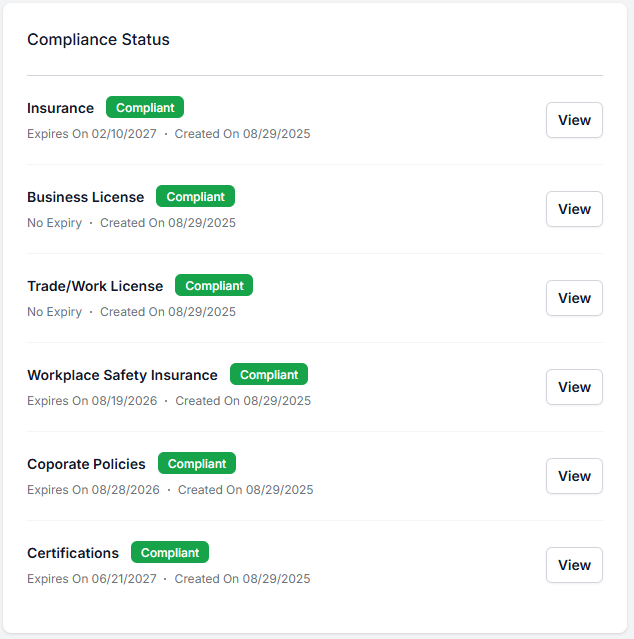
An actual vendor's compliance status inside Entuitive Workforce.
What COI tracking software should verify
A certificate on file is not the same as coverage confirmed. A working COI program verifies the coverage types your contracts require (general liability at minimum, plus auto or umbrella where relevant), the limits your risk team has set, the policy period against today's date, and workers' compensation clearance alongside the COI — WSIB in Ontario, provincial WCBs, CNESST in Quebec, and state programs in the US. Entuitive Workforce holds all of these in one vendor record and routes each one to our compliance team for review, so "compliant" means the whole file was checked by a person, not just uploaded.
Who uses COI tracking software
Commercial property managers and REITs
Hundreds of vendors across a portfolio means certificates expiring every week — live COI status per vendor per property replaces the annual binder check. Seasonal vendors carry the tightest deadlines — snow removal contractors are verified before the first storm.
Construction firms
Subcontractor COIs and workers' comp clearances reviewed before work starts, documented for OHSA due diligence.
Healthcare organizations
Contractor documentation held to audit-grade standards, because that is the standard their own auditors apply.
Insurance brokers and carriers
Policyholders who verify vendor COIs are better risks — fewer surprise claims and cleaner underwriting at renewal.
Skilled trades and independent contractors
One COI and WSIB clearance, uploaded once and shared with every property manager or GC that requires it — instead of re-sending the same documents by email each time a client asks.
Beyond the certificate — compliance status on site
A reviewed COI in the database does not tell the person at the door who is covered today. Tap n' Go QR badging carries compliance status to the site: when a worker’s badge is scanned, it shows the current compliance status of the worker and their employer, as reviewed by our compliance team. The office record and the site team see the same information; the decision to let someone in stays with your site team. See digital badge verification.
How to track subcontractor insurance
Tracking subcontractor insurance comes down to five steps, whether you use software or a spreadsheet:
- Set the requirement for each contract — coverage types, minimum limits, additional insured wording and workers’ compensation.
- Collect the COI and endorsement before work starts — from every tier, including a subcontractor’s own subcontractors.
- Review each certificate against the requirement — named insured, policy dates, limits and additional insured wording. Reject what does not match.
- Track every expiry date and request the renewal before the policy lapses, not after.
- Keep a time-stamped record of each review so you can show coverage on the day the work was done.
COI tracking software runs these steps for every vendor at once. In Entuitive Workforce, a person on our compliance team does the review in step 3, and the platform handles collection, daily expiry monitoring and the record.
COI tracking software — frequently asked questions
What is COI tracking software?
COI tracking software collects certificates of insurance from vendors and contractors, checks them against the hiring organization’s requirements, monitors expiry dates daily, and alerts both sides before coverage lapses. It replaces spreadsheet-based certificate management with a current, time-stamped compliance record.
How do I track subcontractor insurance?
Set the coverage you require for each contract, collect a certificate of insurance and additional insured endorsement from every subcontractor before work starts, review each one against that requirement, track every expiry date and request renewals before they lapse, and keep a time-stamped record of each review.
Who reviews the certificates?
A person on our compliance team reviews every certificate a contractor uploads for coverage, limits, additional insured wording and expiry dates. A certificate that fails review leaves the contractor non-compliant until a corrected one is uploaded.
Why is tracking certificates of insurance important?
A COI only proves coverage existed on its issue date. Policies can be cancelled or changed mid-term, and an expired certificate discovered after an incident can shift the claim to the property owner or general contractor. Continuous tracking closes the gap between annual certificate checks.
How does automated COI tracking work?
Vendors upload certificates during onboarding, and a person on our compliance team reviews each one against the coverage types, limits and dates you require before the vendor is marked compliant. From there, every certificate is monitored daily against its expiry date, and approaching expiries trigger alerts with time to renew.
Can COI tracking software verify workers’ compensation too?
Yes. Entuitive Workforce tracks workers’ compensation clearance alongside COIs — WSIB in Ontario, WorkSafeBC in British Columbia, WCBs in Alberta and other provinces, CNESST in Quebec, and US state programs — in the same vendor compliance file.
How long does it take to onboard vendors?
Onboarding takes minutes, not weeks: vendors receive a document request, upload their certificates through a guided flow, and review starts as soon as the documents are in.
Is there a free trial?
Yes — Entuitive Workforce comes with a free 30-day trial, and you can book a demo to see COI tracking configured for your own vendor list.
See your vendor list with live COI status
The demo runs on your own vendor list and real certificates, not a canned dataset — with a free 30-day trial included.